How Andrej Karpathy's idea can become an English-language knowledge infrastructure for governance
Prepared as a concept note and implementation guide
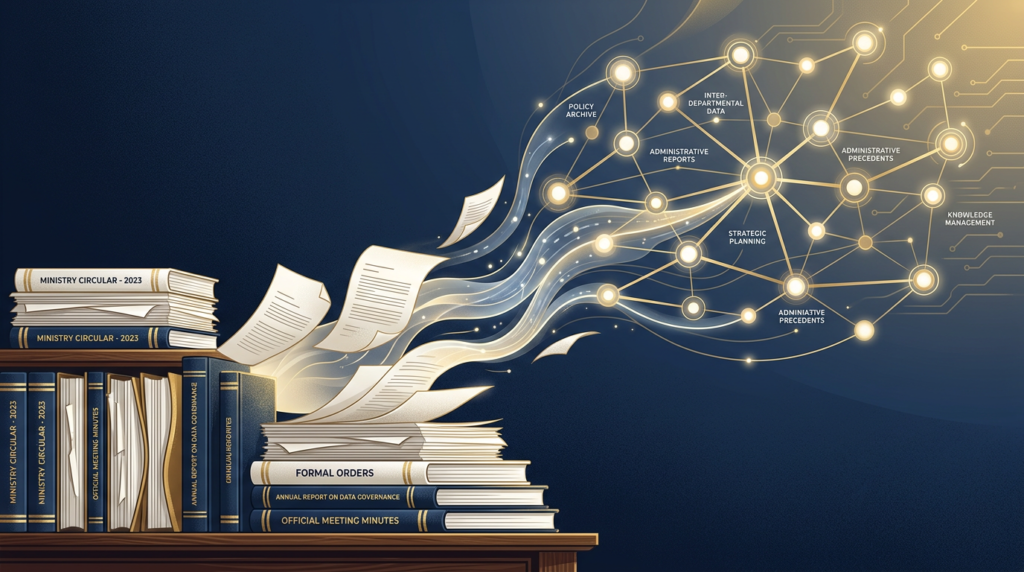
Governments do not suffer from a shortage of documents. They suffer from a shortage of compounding memory. Orders accumulate, circulars overlap, minutes are written and forgotten, clarifications modify earlier instructions, and the same questions return again and again in slightly different forms. Andrej Karpathy's LLM Wiki pattern is compelling because it treats this not as a storage problem, but as a knowledge-compilation problem: the system continuously turns source documents into linked Markdown pages that can be updated, compared, and improved over time.
That distinction matters even in systems that work primarily with English-language files. Administrative reality is still mixed format: an English government order, a policy note, a scanned annexure, a district report with complex tables, a meeting minute, and a court order may all relate to the same issue. Most document systems store these as separate objects. An LLM Wiki can instead help convert them into one evolving knowledge layer while preserving the underlying source files.
RAG vs. LLM Wiki: the strategic difference
| Dimension | RAG | LLM Wiki |
| Core behavior | Retrieves relevant chunks at query time and answers from them. | Compiles knowledge into linked Markdown pages that persist and improve over time. |
| Memory | Mostly stateless across sessions unless an external store is added. | Persistent; the wiki becomes a growing institutional memory. |
| Best use case | Fast Q&A over documents that change often. | Topics that evolve over weeks, months, or years and benefit from synthesis. |
| Contradictions | Usually handled only at answer time, if at all. | Can be flagged during the compilation/update step. |
| Source traceability | Typically, high at the chunk level. | Moderate by default; should be strengthened with links back to source Markdown and PDFs. |
| Governance value | Good for finding documents. | Better for understanding the current state of a subject across many documents. |
RAG and an LLM Wiki are not enemies. They solve different problems. RAG is useful when you need fast retrieval over raw documents, especially when the corpus changes constantly and you care about exact traceability to passages. An LLM Wiki becomes more valuable when the same topic keeps returning over time and the institution needs a reusable understanding of that topic rather than a fresh reconstruction every time a question is aske
Why this matters for governments working mainly with English-language files
The major challenge is not whether English can be stored in Markdown. It can. The real challenge is extraction quality. If the source PDF is born-digital, the path is relatively straightforward: convert it into clean Markdown, normalize metadata, and feed it into the wiki compiler. If the source is scanned, the PDF must first go through OCR before it can become reliable text.
This is why the best mental model is to think in layers. First comes the raw record. Then comes extracted Markdown. Then comes the compiled wiki. Finally comes the assistant or search interface that answers user questions. Keeping these layers separate preserves traceability and makes the system far more maintainable.
What the knowledge architecture should look like:
At the bottom sits the source layer: original PDFs, scanned orders, minutes, annexures, spreadsheets, policy notes, and court documents. Above that sits the conversion layer, where raw files are converted into machine-usable Markdown. Above that sits the compiled wiki layer: concept pages, process pages, chronology pages, instruction pages, compliance pages, and glossary pages. At the top sits the assistant layer: the interface through which officers, analysts, or researchers ask questions and generate briefs.
This architecture matters because it separates three things that are often confused with each other: raw record, extracted text, and compiled knowledge. Once those are separated, institutions can preserve the official source while still benefiting from AI-assisted synthesis.
Implementation steps
At a glance: Two implementation paths
| Step | Digital PDF workflow | Scanned PDF workflow |
| 1 | Store original file in raw/. | Store original scanned file in raw/. |
| 2 | Convert PDF directly to Markdown with PyMuPDF4LLM or Docling. | Run OCR first using Hindi or Hindi+English. |
| 3 | Clean headers, footers, page numbers, and layout artifacts. | Clean OCR noise, broken lines, stamps, and repeated scan artifacts. |
| 4 | Attach metadata such as title, date, language, and source file name. | Attach the same metadata and add an OCR-confidence note if needed. |
| 5 | Save clean Markdown in markdown/. | Save cleaned text as Markdown in markdown/. |
| 6 | Ask the LLM to create or update linked wiki pages in wiki/. | Ask the LLM to create or update linked wiki pages in wiki/. |
| 7 | Run audit/linting to find stale pages, duplicates, and contradictions. | Run audit/linting and manually review low-confidence pages. |
Step 1: Create the folder structure
Begin with a simple directory structure. A clean setup is better than a complicated one. One folder should preserve original source files, one should store extracted Markdown, one should store compiled wiki pages, and one should store logs or audit outputs.
gov-llm-wiki/
├── raw/
├── markdown/
├── wiki/
└── logs/
Step 2: Decide whether the PDF is digital or scanned
This branching decision is crucial. If text can be selected normally, the file is usually born-digital and can often be converted directly into Markdown. If each page behaves like an image, it is scanned and OCR is required. Treating both file types in the same way will usually produce poor results.
Step 3A: Digital PDF workflow
For born-digital PDFs, the goal is direct structured extraction. PyMuPDF4LLM is designed specifically for extracting PDF content into Markdown, JSON, or TXT for LLM and RAG workflows. Docling is another strong option because it parses diverse formats and is designed to prepare documents for AI pipelines.
import pathlib
import pymupdf4llm
input_pdf = 'raw/sample.pdf'
output_md = 'markdown/sample.md'
md_text = pymupdf4llm.to_markdown(input_pdf)
pathlib.Path(output_md).write_text(md_text, encoding='utf-8')
After extraction, clean the Markdown: remove repeated headers and footers, fix page-number artifacts, preserve headings, and attach metadata such as title, date, language, and source file name.
Step 3B: Scanned PDF workflow
For scanned PDFs, OCR must come first. Tesseract can be used for English OCR, and many government documents still contain stamps, headers, signatures, page skew, and table artifacts that need cleanup after OCR.
tesseract page1.png output_page1 -l eng
Once OCR text is available, merge the pages, clean broken lines and scan artifacts, preserve headings and section breaks, and then save the result as structured Markdown. Low-confidence OCR output should be flagged for manual review before it becomes part of the long-term wiki.
Step 4: Save every extracted document as structured Markdown
The wiki should not be built directly on raw PDFs. It should be built on clean UTF-8 Markdown derived from those PDFs. Markdown is easy to diff, easy to version, easy to link, and much easier for an LLM to read and update.
---
title: Government Order - Statewide Vaccination Campaign
document_type: government_order
language: en
date: 2026-03-14
source_file: GO_2026_03_14.pdf
---
# Statewide Vaccination Campaign
## Objective
...
## Key Instructions
...
Step 5: Compile the first wiki pages
Now the LLM Wiki pattern begins to matter. Instead of creating one summary per file and stopping there, ask the model to create topic pages. A topic page should represent one concept, one process, one policy theme, or one evolving issue. The model should create linked pages, summarize the current position, capture important dates, and explicitly flag contradictions or supersessions.
Read the Markdown files in markdown/.
Create topic pages in wiki/.
For each key concept, process, instruction, or recurring issue:
1. create one Markdown page,
2. summarize the current position,
3. record major source dates,
4. add [[wiki-links]] to related pages,
5. flag contradictions or supersessions,
6. preserve whether the source material is English, scanned English, or mixed-format.
Step 6: Add incremental compilation
The real power of the pattern lies in what happens when the next document arrives. New sources should update the existing wiki, not merely sit beside it. Every new order, note, or report should trigger a compilation step that updates affected pages, creates new pages when necessary, and revises chronology.
A new Markdown source has been added to markdown/.
Read it together with the existing wiki/.
Update any affected pages.
Create new pages for genuinely new concepts.
Flag contradictions with earlier material.
Update cross-links and chronology.
Do not delete prior history unless the new source clearly supersedes it.
Step 7: Keep an index and a change log
As the wiki grows, it needs navigational help. Maintain an index page listing all major topic pages and a log page recording what was compiled, when, and from which source. This makes the system inspectable rather than opaque.
Step 8: Run periodic audit and linting
A long-lived wiki needs maintenance. Periodic audit should look for duplicate pages, missing linked pages, contradictions, stale instructions, and low-confidence OCR content. This is what prevents the knowledge layer from drifting into quiet inconsistency.
Audit the entire wiki/.
Identify:
1. orphan pages,
2. duplicate pages,
3. missing linked pages,
4. contradictions,
5. stale claims superseded by newer sources,
6. pages built from low-confidence OCR text.
Suggest fixes and apply only those strongly supported by the source Markdown.
What this architecture achieves
Done well, this architecture creates something governments rarely have: an institutional memory built from English-language files that improves over time instead of resetting every time a person changes, a file moves, or a new clarification arrives. Traditional document management stores files. RAG helps search files. An LLM Wiki helps build a living map of the knowledge inside those files.
That is why Karpathy's idea deserves attention in governance settings. It offers a path from document accumulation to knowledge compounding, from fragmented files to linked understanding, and from repetitive retrieval to a durable administrative intelligence layer.
Sources for further reading
Andrej Karpathy, “LLM Wiki”
The original source for the idea. Karpathy’s gist introduces the concept of using an LLM to maintain a persistent wiki made of linked Markdown pages that can be updated, cross-referenced, and audited over time. It is the best place to understand the core philosophy behind the pattern.
https://gist.github.com/karpathy/442a6bf555914893e9891c11519de94f
Data Science Dojo, “The LLM Wiki Pattern by Andrej Karpathy: A Step-by-Step Tutorial to Building a Compounding Knowledge Base”
A reader-friendly walkthrough of the concept. This article is especially useful for understanding the practical contrast between RAG and an LLM Wiki, and for seeing a simple folder-based implementation approach.
https://datasciencedojo.com/blog/llm-wiki-tutorial
PyMuPDF4LLM Documentation
A practical reference for readers who want to implement the “digital PDF to Markdown” workflow. The documentation shows that PyMuPDF4LLM supports extraction to Markdown, JSON, and TXT, and includes the to_markdown() method used in many simple pipelines.
https://pymupdf.readthedocs.io/en/latest/pymupdf4llm
https://github.com/pymupdf/pymupdf4llm
Docling Documentation
A strong reference for more advanced document pipelines. Docling is designed to turn messy documents into structured data and supports reading order, OCR, table detection, and downstream AI processing.
Tesseract OCR Documentation
The standard reference for OCR workflows. Tesseract’s documentation explains installation, language data, and the basic requirements for OCR-based pipelines, which is especially relevant for scanned PDF workflows.
https://tesseract-ocr.github.io/tessdoc/Installation.html
OCRmyPDF Documentation: Installing Additional Language Packs
Helpful for readers who want a more practical OCR pipeline for scanned PDFs. OCRmyPDF builds on Tesseract and explains how language packs are handled, including the fact that English is often installed by default but not always.